
Why Your AI Videos Might Not Be Fooling Anyone
AI video generation has become remarkably accessible. What once required Hollywood-level budgets and specialised teams can now happen on your laptop. But there's a catch – the technology is only as good as the person using it, and beginners often fall into predictable traps that make their creations look unmistakably artificial.
If you've generated AI videos that felt "off" but couldn't pinpoint why, you're not alone. The difference between convincing AI footage and obviously fake content often comes down to understanding common pitfalls and knowing how to avoid them.
Let's walk through the nine mistakes that trip up most beginners, along with practical fixes you can apply immediately.
Mistake 1: Ignoring the Uncanny Valley in Human Subjects
The most jarring AI video artefacts appear when generating people. Hands with extra fingers, eyes that don't quite track together, teeth that blur into a single white mass – these details immediately signal "fake" to viewers.
How to Fix It
When your video requires human subjects, pay close attention to close-ups of hands, faces, and fine details. If you're using AI to generate imagery of people, consider whether a static image might work better than motion for those particular shots. For understanding the fundamentals behind these visual generation challenges, our guide on how AI image generators actually work explains why certain elements prove more difficult than others.
Another approach: keep human subjects at medium distance or use creative framing that doesn't demand perfect detail. A silhouette against a sunset tells a story without requiring flawless finger rendering.

Mistake 2: Overlooking Temporal Consistency
AI might generate a beautiful frame, then a slightly different beautiful frame, then another – but strung together, objects subtly change shape, colours shift unexpectedly, and backgrounds morph in ways real footage never would.
How to Fix It
Pay attention to consistency across your video's duration. When prompting AI video tools, be specific about maintaining stable elements throughout. If a character wears a blue jacket in frame one, that jacket shouldn't become teal by frame fifty.
For projects where visual consistency matters greatly, consider generating key frames as still images first, then using those as reference points. Working with an AI photo editor to perfect your key frames before animating them can help establish a consistent visual foundation.
Mistake 3: Unnatural Motion and Physics
Real-world objects obey physics. Hair bounces with a certain weight. Fabric folds predictably. Liquids splash in consistent patterns. AI-generated motion often gets this wrong – hair might float like it's underwater, or a bouncing ball might suddenly change speed mid-bounce.
How to Fix It
Study real footage of whatever you're trying to generate. If you need realistic walking motion, watch actual people walk. Notice how weight shifts, how arms swing opposite to legs, how clothing responds to movement.
When generating, start with simpler motions before attempting complex actions. A person turning their head is more likely to look natural than a person doing a backflip. Build your skills progressively rather than attempting the most ambitious shots first.
Mistake 4: Flat or Inconsistent Lighting
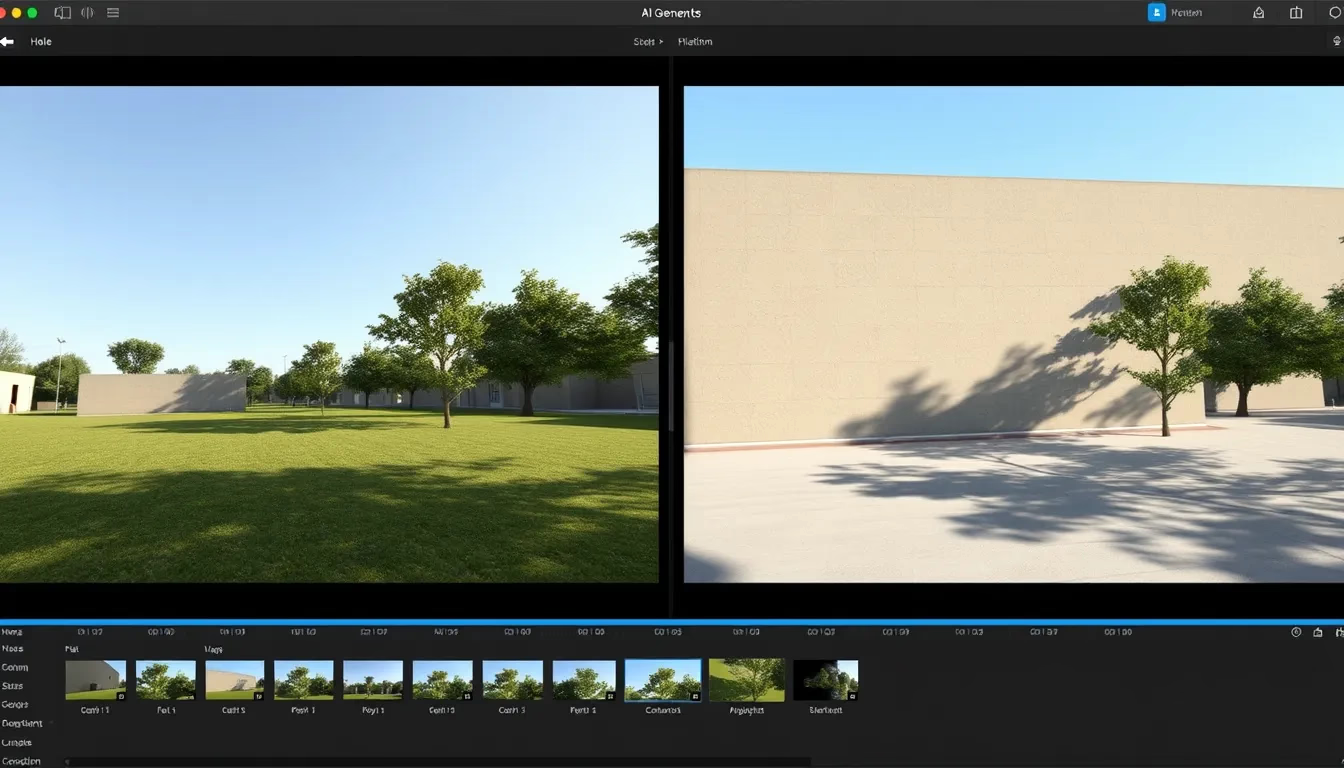
Lighting sells reality. In authentic footage, light has direction, shadows fall consistently, and surfaces reflect appropriately. AI videos often feature lighting that seems to come from everywhere at once, or shadows that point in contradictory directions.
How to Fix It
Before generating, decide where your light source is. Mention it explicitly in your prompts – "warm sunset light from the left," "harsh overhead fluorescent," "soft diffused daylight from a window." The more specific your lighting direction, the more likely you'll get consistent results.
Watch for multiple shadows on single objects, which is a dead giveaway of AI confusion. If you spot this issue, regenerate with clearer lighting instructions rather than trying to fix it in post-production.
Mistake 5: Generic or Vague Prompts
Telling AI to generate "a video of a city" gives it enormous latitude to produce something mediocre. Without specific direction, you'll likely get generic results that look like stock footage nobody would actually use.
How to Fix It
Get specific. Instead of "a city," try "a rainy Tokyo side street at night, neon signs reflecting on wet pavement, a single person with an umbrella walking away from camera." Details constrain the AI in productive ways.
Think about mood, time of day, weather, camera angle, and movement. The more precise your mental image, the closer the AI can get to realising it. If you've worked on AI social media content before, the same prompting principles apply – specificity wins.
Mistake 6: Neglecting Audio Considerations
This might seem outside AI video generation's scope, but silence or mismatched audio destroys immersion instantly. A beautifully generated forest scene feels wrong without ambient bird sounds and rustling leaves.
How to Fix It
Plan for audio from the start. If your video shows ocean waves, you'll need wave sounds that match the visual rhythm. If there's dialogue, lip movements need to align – a notorious weak point for AI video.
Consider whether your concept actually requires synchronised audio. Many successful AI videos use music beds or voiceover narration rather than attempting realistic sync sound, side-stepping the problem entirely.
Mistake 7: Ignoring Resolution and Aspect Ratio
Generating video at the wrong resolution or aspect ratio for your intended platform creates immediate quality issues. Upscaling low-resolution AI video introduces blur and artefacts. Cropping to fix aspect ratio loses important visual information.
How to Fix It
Know your destination before you generate. Instagram Reels want 9:16 vertical. YouTube prefers 16:9 horizontal. TikTok can go either way but favours vertical. Generate at the correct dimensions from the start rather than trying to adapt later.
For resolution, generate at the highest quality your tools and hardware allow. It's much easier to downscale crisp footage than to upscale blurry footage without introducing obvious AI processing artefacts.
Mistake 8: Trying to Do Too Much in One Shot
Beginners often attempt complex scenes with multiple moving elements, intricate interactions, and elaborate camera movements all at once. Current AI video technology handles simplicity far better than complexity.
How to Fix It
Break ambitious ideas into simpler shots. Instead of generating one continuous shot of someone walking through a crowd, picking up a coffee, and sitting at a table, create separate shots: the walk, the pickup, the sitting. Edit them together conventionally.
This approach also gives you more control. If the coffee pickup looks fake but everything else works, you only regenerate that single shot rather than starting over entirely. Working with merged photos and composite images follows similar logic – build complexity from simpler elements.
Mistake 9: Not Reviewing at Full Speed and Full Screen
Many beginners spot-check their AI videos in small preview windows or skip through quickly. Problems that seem minor in a thumbnail become glaring on a proper screen at normal playback speed.
How to Fix It
Watch your generated video the way your audience will watch it. Full screen. Full speed. Multiple times. What did you miss the first time that jumped out the second? Where does your eye naturally focus, and does that area hold up to scrutiny?
Better yet, show it to someone who doesn't know it's AI-generated and watch their reaction. The moments where they squint or look confused often reveal exactly where your video loses believability.
Building Better AI Video Skills Takes Practice
Every tool has a learning curve, and AI video generation is no exception. The creators producing convincing results have likely generated hundreds of failed attempts before finding what works. Don't expect perfection immediately.
Start with simple projects that play to AI's current strengths: landscapes, abstract concepts, stylised rather than photorealistic content. As you develop intuition for prompting and recognise patterns in what succeeds and fails, gradually increase complexity.
The technology improves constantly, but so should your skills in directing it. Understanding these common mistakes puts you ahead of most beginners still wondering why their AI videos look fake.
Making AI-Generated Visuals Work for Your Projects
Whether you're creating content for social media, building visual assets for a larger project, or simply exploring what's possible, avoiding these nine mistakes will dramatically improve your results. AI video generation isn't magic – it's a tool that responds to how you use it.
For projects where still images might serve you better than video, Photomize AI offers accessible tools for generating and refining visual content. Sometimes a striking static image communicates more effectively than mediocre motion footage.
The goal isn't to fool everyone into thinking AI footage is real – it's to create visuals compelling enough that the question stops mattering. When viewers are engaged by what they're watching, they stop scrutinising technical details and start experiencing your content as you intended.